
Summit Exhibitor
Booth Information &
Advert Specifications
Exhibition Booth Artwork
The Africa Energies Summit offers two sizes of Exhibition Booth in the venue; the Executive Booth and a Headline Booth. The booth that you have purchased will be detailed on your contract with Frontier.
As well as artwork for Exhibition booths, some sponsors and exhibitors have the option to supply an advert in the Summit Magazine. Details of the advertisement specifications are below for your information. Don't hesitate to reach out to us if you need any more information or guidance on artwork specifications either by phone + 44 208 1947 051 or email us at info@frontierenergy.network
Notes to Exhibitors
Artwork deadline for all exhibition stand artwork is latest 17th April 2026.
Artwork to be emailed to mini@frontierenergy.network
All exhibitor stand packages include the backdrop, counter and two stools.
Detailed artwork specifications are provided below for each individual booth category
All exhibitor have the option to add extras to the package including extra stools and a TV Screen with wireless keyboard. If a TV screen has been ordered this will affect the artwork.
All exhibitors have to supply artwork for the backdrop and counter, as per template.
Artwork supplied after the deadline would be subject to a surcharge as from this date we schedule the work into production.
Once you have supplied your artwork, you will be emailed a proof to show that the artwork is a good quality for print and that all is in order for production.
Once approved, the stands will be manufactured and erected by Frontier in the position you have chosen on the event floor plan the evening before the event.
If you have any questions about the artwork that needs to be supplied; please don’t hesitate to contact us.
No free standing exhibition banners are allowed in the exhibition space to keep the space clear.
If you have ordered a TV screen avoid key graphics where the screen placement is shown. However, do not show the screen directly on your artwork.
If you have opted to add a TV screen as an extra to your booth,
a. All screens have USB ports, and come with a HDMI cable connected, ready for use if you wish to bring a laptop.
b. Windows laptops are best for connecting with the screens.
c. We do not supply any adapters, so please account for this if you require one for your laptop.
d. Supplied screens have a 16:9 aspect ratio. Please consider this when saving images and video files.
e. The HDMI cable enables your laptop screen to be mirrored onto the stand screen (please check your laptop supports this). This is particularly useful if there are demonstrations you wish to show from your laptop. Your laptop can be placed neatly behind the stand on the provided shelf where the HDMI cable will be. If your stand backs onto another, please carefully peel away the side panel above the shelf to access the HDMI and power socket.
f. A wireless keyboard and mouse is available for your use if you wish. The USB receiver will be in the box, or in the underside of the mouse in the battery compartment. These are very small and forgotten easily sometimes. Please make sure you do your best to remember to remove this from your laptop when you leave your stand, and place it back into the box/mouse, otherwise there may be a charge for this to be replaced.
g. File formats for USB drive (please do not use really old USB drives, or security protected).
h. Video files – Save as an MP4 file (please note that if there is no audio file on the video, an error message will appear on the screen, “Audio unsupported”)
i. Image files – Save as JPEG’s in a designated folder
i. PowerPoint presentations – Do not work through USB. Only use these if you have a laptop, or in new versions of PowerPoint you can save it as an MP4 file.
Exhibition Booth Specs
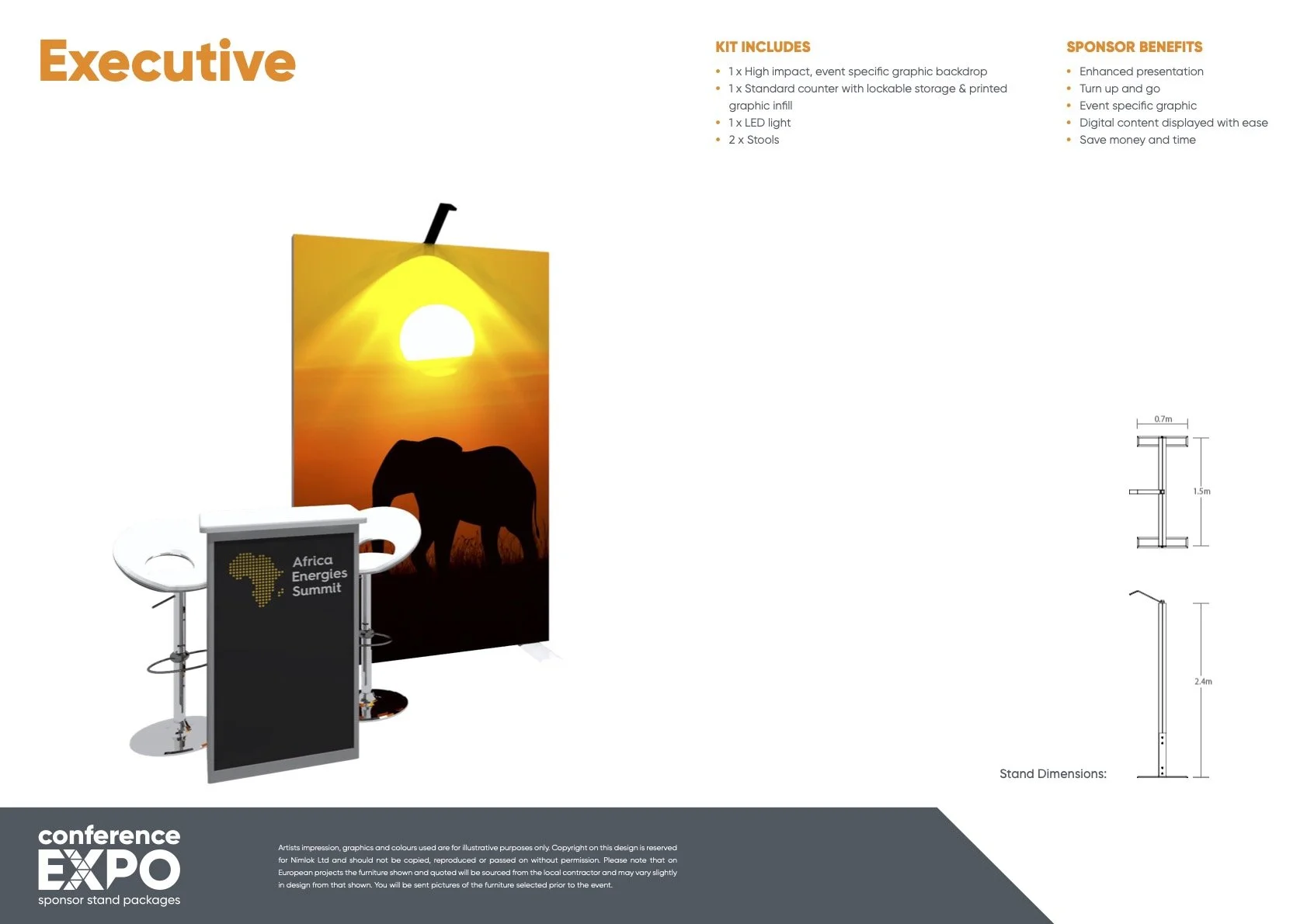
Executive Booth
Artwork Guidance
Your artwork template can be accessed via the download button on the left.
Please place the template into your preferred design software (e.g. Adobe Illustrator) and retain it at quarter (¼) size as supplied. The template must not be resized.
If your stand includes a screen or shelf, these will be shaded pink on the template. Please ensure that no key graphics, messaging, or logos are positioned within these areas.
All text and logos must be supplied in vector format.
Any images used must have a minimum resolution of 300dpi at quarter (¼) size.
Please do not add bleed, crop marks, or any additional printer’s marks.
Completed artwork should be saved as a high-resolution PDF and submit your saved artwork to Mini.
Should your artwork require amendments (for example, incorrect sizing or low-resolution imagery), our team will notify you with the necessary revisions.
Once approved, a proof of your stand artwork will be shared with you for confirmation.
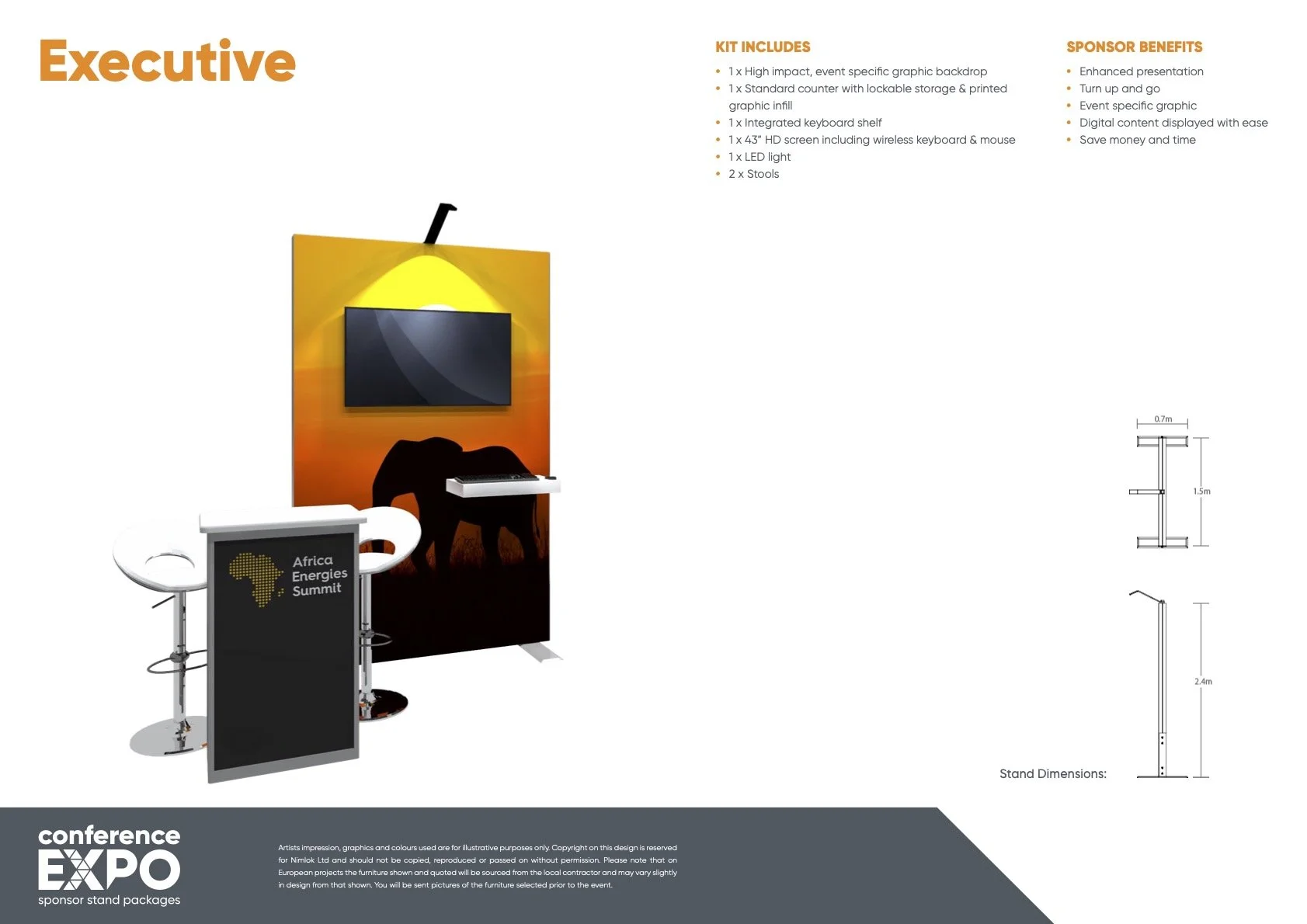
Executive Booth with TV
Artwork Guidance
Your artwork template can be accessed via the download button on the left.
Please place the template into your preferred design software (e.g. Adobe Illustrator) and retain it at quarter (¼) size as supplied. The template must not be resized.
If your stand includes a screen or shelf, these will be shaded pink on the template. Please ensure that no key graphics, messaging, or logos are positioned within these areas.
All text and logos must be supplied in vector format.
Any images used must have a minimum resolution of 300dpi at quarter (¼) size.
Please do not add bleed, crop marks, or any additional printer’s marks.
Completed artwork should be saved as a high-resolution PDF and submit your saved artwork to Mini.
Should your artwork require amendments (for example, incorrect sizing or low-resolution imagery), our team will notify you with the necessary revisions.
Once approved, a proof of your stand artwork will be shared with you for confirmation.
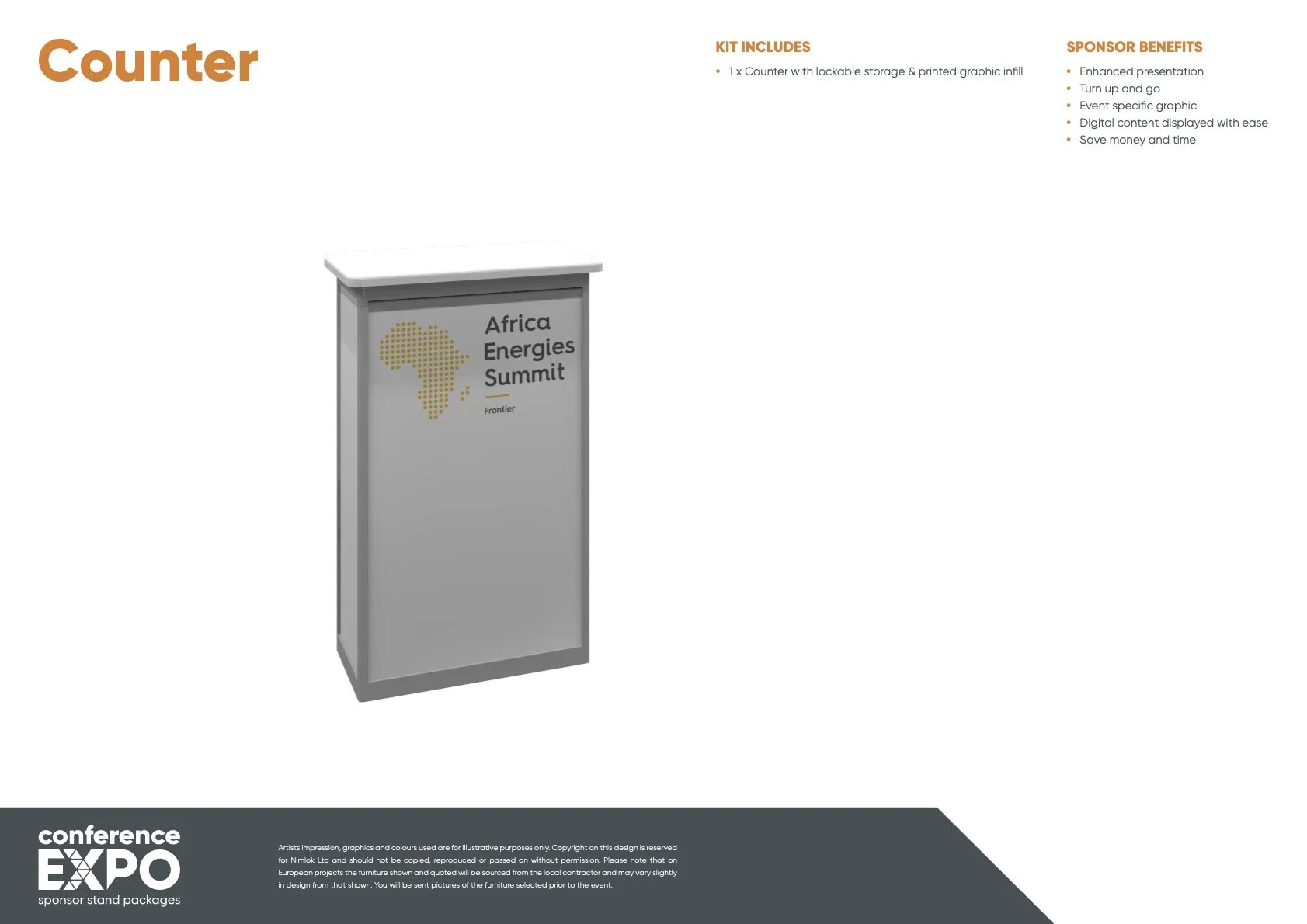
Standard Counter
Included in both the Booth Packages
Artwork Guidance
Your artwork template can be accessed via the download button on the left.
Please place the template into your preferred design software (e.g. Adobe Illustrator) and retain it at quarter (¼) size as supplied. The template must not be resized.
All text and logos must be supplied in vector format.
Any images used must have a minimum resolution of 300dpi at quarter (¼) size.
Please do not add bleed, crop marks, or any additional printer’s marks.
Completed artwork should be saved as a high-resolution PDF and submit your saved artwork to Mini.
Should your artwork require amendments (for example, incorrect sizing or low-resolution imagery), our team will notify you with the necessary revisions.
Once approved, a proof of your stand artwork will be shared with you for confirmation.
Headline Booth
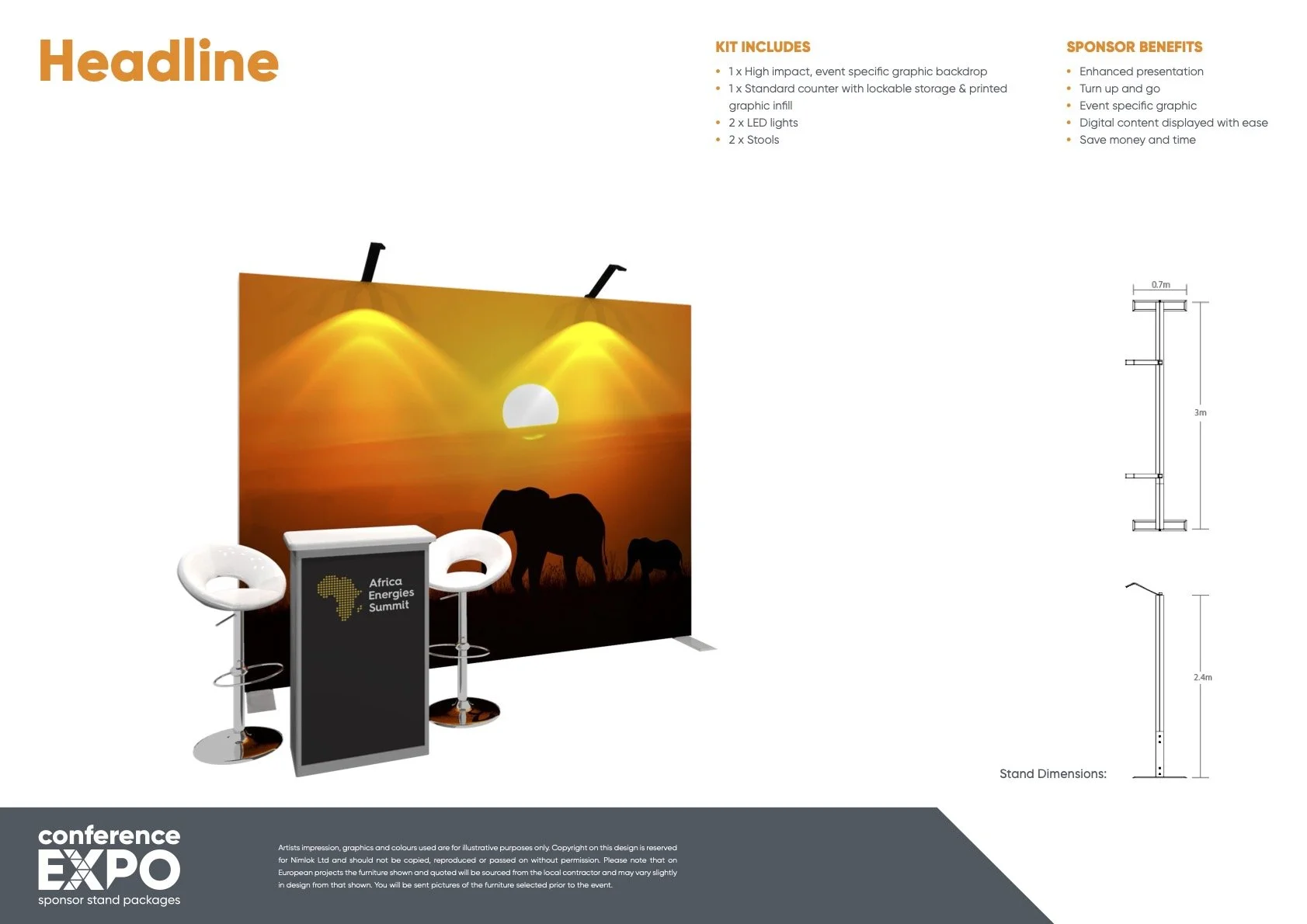
Artwork Guidance
Your artwork template can be accessed via the download button on the left.
Please place the template into your preferred design software (e.g. Adobe Illustrator) and retain it at quarter (¼) size as supplied. The template must not be resized.
If your stand includes a screen or shelf, these will be shaded pink on the template. Please ensure that no key graphics, messaging, or logos are positioned within these areas.
All text and logos must be supplied in vector format.
Any images used must have a minimum resolution of 300dpi at quarter (¼) size.
Please do not add bleed, crop marks, or any additional printer’s marks.
Completed artwork should be saved as a high-resolution PDF and submit your saved artwork to Mini.
Should your artwork require amendments (for example, incorrect sizing or low-resolution imagery), our team will notify you with the necessary revisions.
Once approved, a proof of your stand artwork will be shared with you for confirmation.
Headline Booth with TV
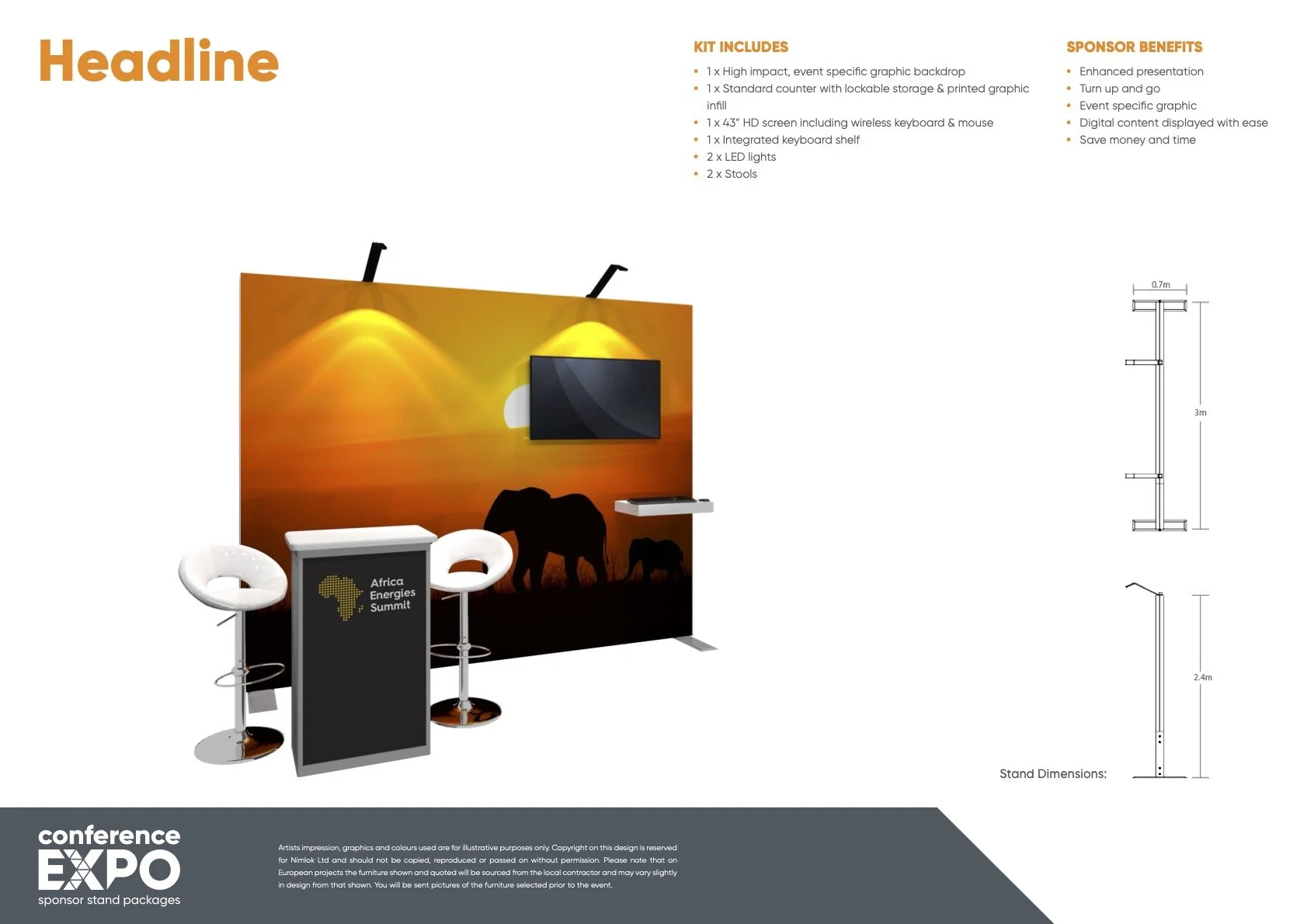
Artwork Guidance
Your artwork template can be accessed via the download button on the left.
Please place the template into your preferred design software (e.g. Adobe Illustrator) and retain it at quarter (¼) size as supplied. The template must not be resized.
If your stand includes a screen or shelf, these will be shaded pink on the template. Please ensure that no key graphics, messaging, or logos are positioned within these areas.
All text and logos must be supplied in vector format.
Any images used must have a minimum resolution of 300dpi at quarter (¼) size.
Please do not add bleed, crop marks, or any additional printer’s marks.
Completed artwork should be saved as a high-resolution PDF and submit your saved artwork to Mini.
Should your artwork require amendments (for example, incorrect sizing or low-resolution imagery), our team will notify you with the necessary revisions.
Once approved, a proof of your stand artwork will be shared with you for confirmation.
Booth Optional Extras Available
Optional Extras are on request only and will be invoiced to the same entity as previous invoices.
To order optional extras for your booth email Mini
Booth TV Screen & Wireless Keyboard 43” £450 + VAT
Extra Booth Stool £105 + VAT(per stool)
Concertina Literature Rack £150 + VAT
Counter Upgrade to XL (only relevant to Headline Booth) £350 + VAT
Summit Advert Specs
Advert deadline is 17th April 2026.
Adverts to be emailed to mini@frontierenergy.network.
Adverts must be supplied in high resolution PDF, no less than 300 dpi, CMYK with bleed and crop marks as appropriate.
The size of your advertisement in the printed conference program will be detailed in your Sponsor/ Exhibitor contract.
Our publication is A4 and we require 3mm bleed all round.
Artwork supplied after the deadline would be subject to a surcharge as from this date we schedule the work into production.
-
297mm(h) x 420mm(w) - Trim
303mm(h) x 426mm(w) - Bleed
-
297mm(h) x 210mm(w) - Trim
303mm(h) x 216mm(w) - Bleed
277mm(h) x 190mm(w) - Type Area
-
148mm(h) x 210mm(w) - Trim
154mm(h) x 216mm(w) - Bleed
135mm(h) x 190mm(w) - Type Area